How I'd wire Shopify, the 3PL and the ERP
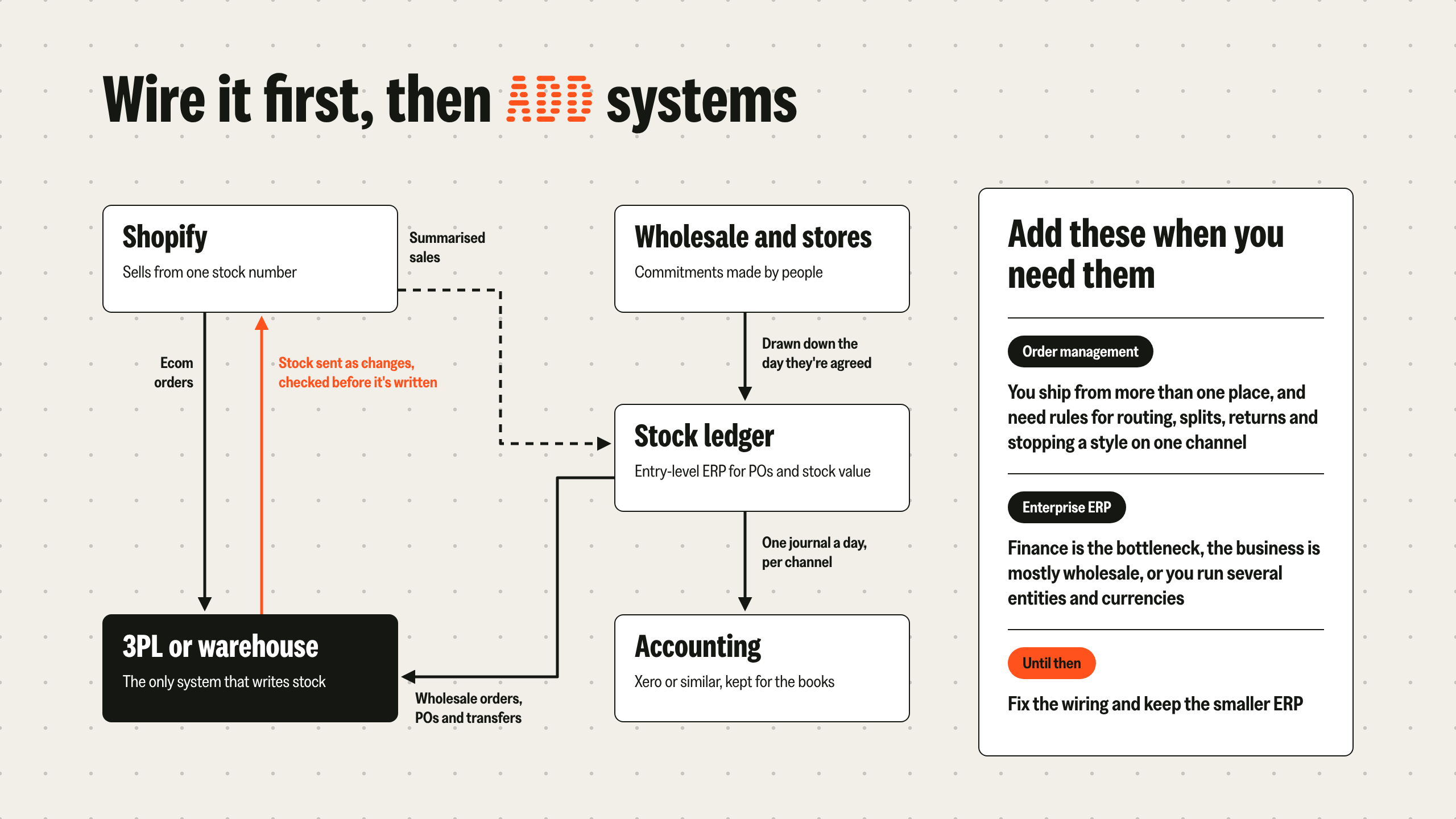
Nine times out of ten, I'd connect Shopify straight to the 3PL or warehouse system. Even at the highest volumes, that's what any integration platform will recommend anyway.
The ERP sits alongside it as the stock ledger. It gets summarised sales, plus stock movements, purchase orders (POs) and wholesale orders, so it can value the stock and support the month-end close.
You can still send completed, shipped orders across afterwards if you want the detail.
Keep ecom orders off the ERP
Putting the ERP on the order path is expensive. If every ecom order has to pass through it on the way to the warehouse, the ERP has to be fast, current and able to survive peak.
That's what enterprise pricing pays for, often £100,000 or more a year. Take the ERP off the order path and an entry-level one does the ledger job as well as a pricier one.
The exception is multi-entity. Unlucky if you're there, though the options are getting better.
A stock ledger and an ERP aren't always the same thing
What you need is a ledger that can say what's sellable on each channel when several channels compete for the same stock. It doesn't have to be called an ERP.
With one wholesale warehouse and one ecom warehouse, you won't have this problem. If you only sell ecom, your warehouse system can be the ledger.
The complexity comes with international expansion and more channels. Even then, I'd improve the warehouse-to-Shopify integration and get POs and inbound shipments into the warehouse system before adding a ledger for the sake of it.
Should your ERP post every Shopify order to Xero?
I wouldn't. Entry-level ERPs like Cin7 Core usually keep Xero in the stack for the books, and accounting platforms aren't built for order-level volume.
The trap I see most is an ERP set to post every Shopify sale to Xero as its own invoice. Xero's API allows 5,000 calls a day per organisation, so one busy week or one launch runs into the limit, and the sync backs up just as finance needs the numbers. Plenty of brands report slowdowns before they even hit it.
So I'd post a daily summary instead, using something like A2X. That's one journal per day per channel, with sales, discounts, refunds and payment fees. The order detail stays in the ERP, finance gets books that reconcile, and the API copes.
The newer AI-native ledgers, like Campfire and Rillet, are built to take transaction-level data, so the summarising step goes away. If you're already thinking about moving off Xero, weigh that alongside the ERP decision.
When do you need order management?
When you need it, and that's usually when there's more than one place to ship from.
UK brands, fashion especially, have tended to keep stock in one location, so it comes later. US brands often run several warehouses much earlier, which is why order management is more advanced in the US ecom ecosystem.
By order management, I mean rules and automation that decide:
- Where an order ships from, and when it splits across sites
- Where a return becomes sellable again (US returns going back out to US customers, say)
- When to stop a style showing on one channel, without phoning the warehouse
ERPs and 3PLs aren't really set up to make these decisions. A lot of ecom-specific 3PLs have built order management in, to fill that gap for the brands they work with.
When an enterprise ERP is the right call
Keeping an investor happy is one reason I hear (more often than you'd think). The real ones look like this:
- Finance has become the bottleneck
- The business is mostly wholesale distribution, which is where a lot of enterprise ERPs (NetSuite in particular) grew up
- Several entities, multiple currencies, consolidated warehouses and auditors who want one set of numbers
- A requirement only an enterprise system can meet
Last year I worked on an advisory brief that needed alcohol duty accrual handled in the accounting system. Realistically only SAP and NetSuite could meet it, so we went with NetSuite.
A wholesale-led brand with one 3PL and a couple of stores probably doesn't need one. I'd fix the integration and keep the smaller ERP in place.
If you've outgrown your entry-level ERP and aren't sold on going enterprise, talk to me before you sign. There are other ways through this now.
Overselling on Shopify: quick answers
Does Shopify reserve stock for unfulfilled orders?
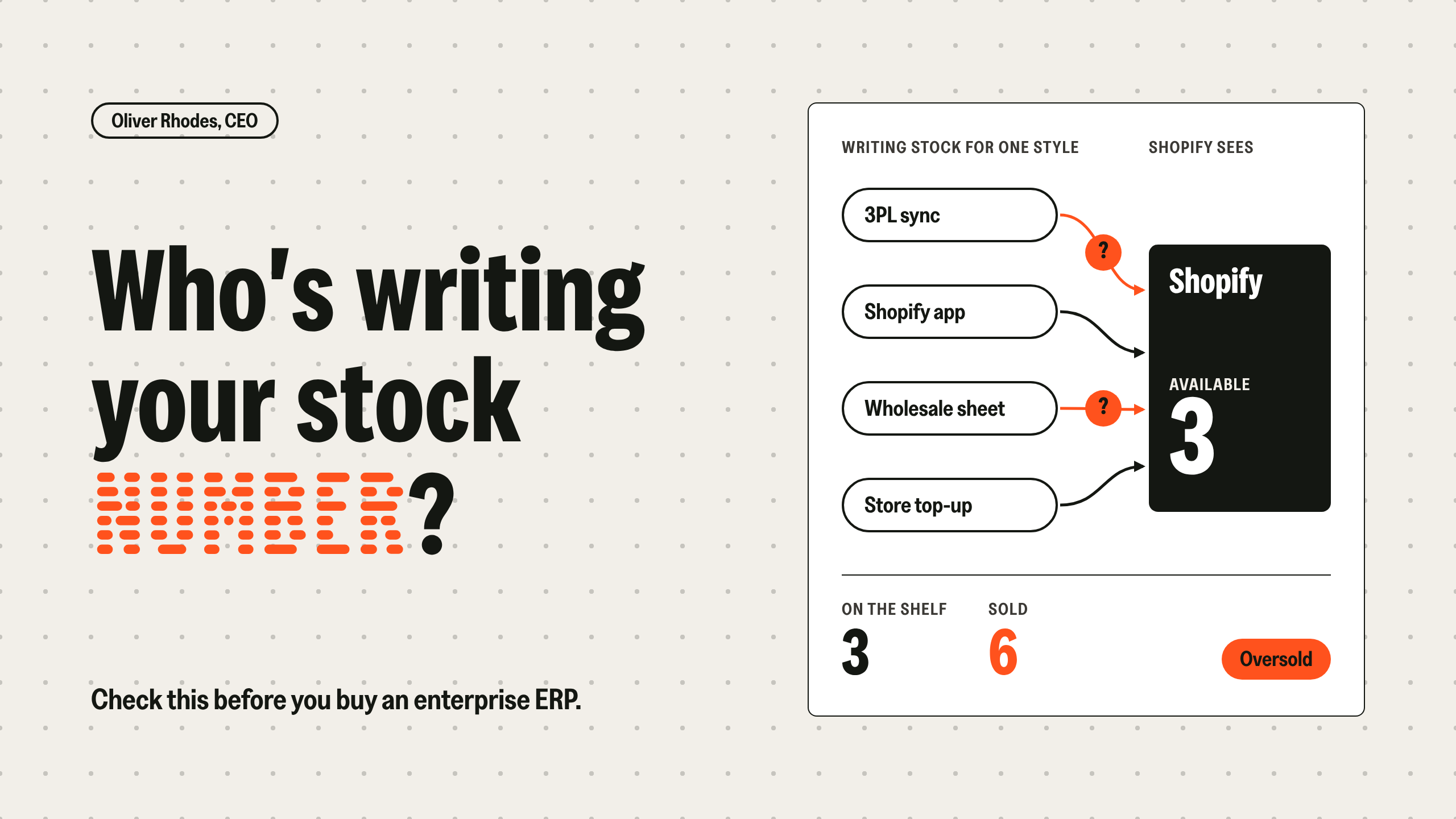
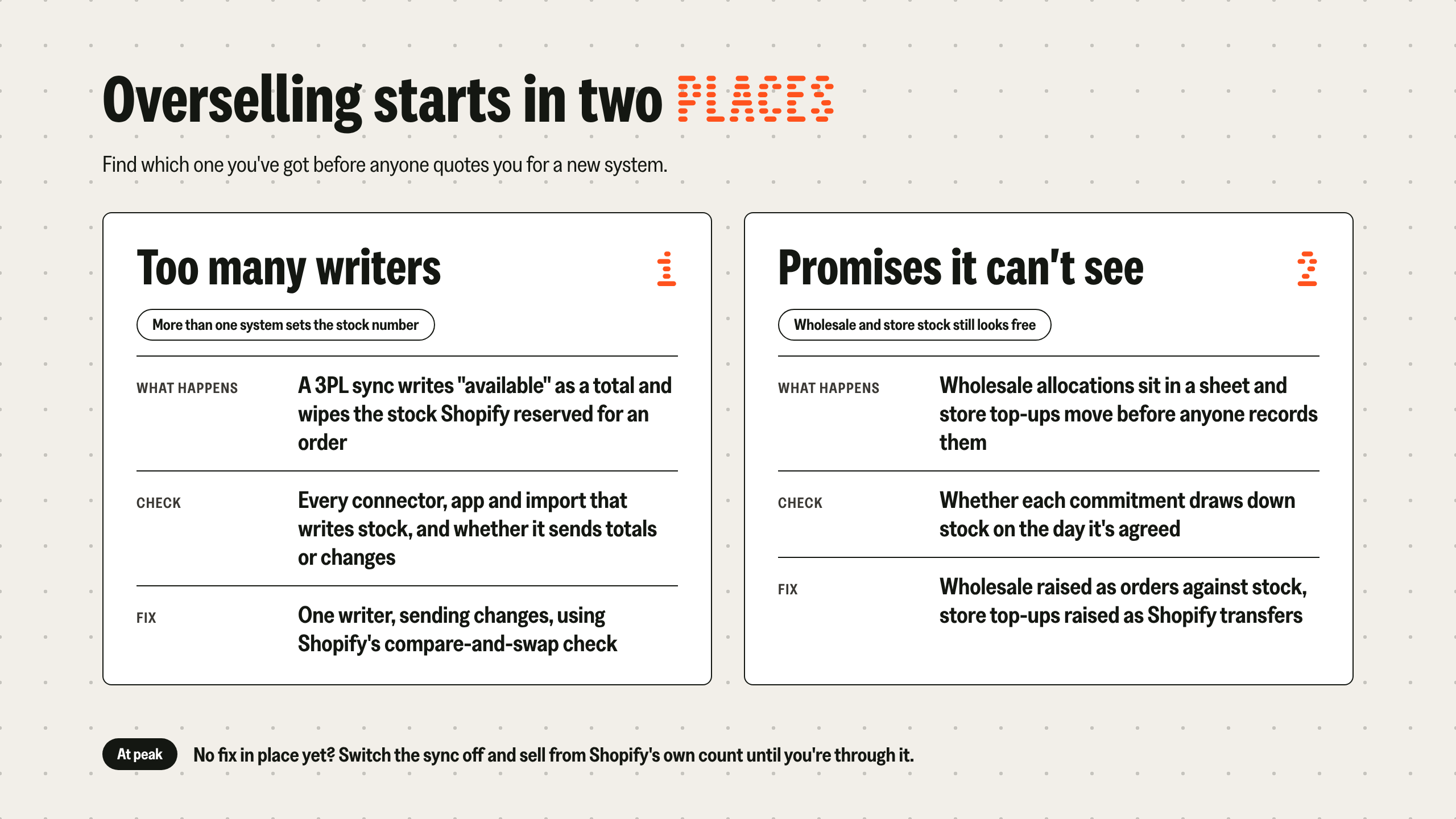
Yes. Shopify tracks on hand, committed and available separately, and moves units to committed when an order is placed. An external system that writes available as an absolute total can overwrite that reservation. Since API version 2026-04, those writes have to state the quantity they expect to replace, and stale ones are rejected unless the integration opts out.
Why does stock oversell during a drop or flash sale?
Because the warehouse's update goes stale on the way. By the time a sync posts its count back to Shopify, more units have sold, and an absolute total puts that stock back on sale. Sending changes instead of totals, or using Shopify's compare-and-swap check, stops it. Switching the sync off for peak is the fallback.
Do I need an ERP to stop overselling on Shopify?
Usually not. Most overselling comes from how Shopify, the warehouse and wholesale are wired: more than one system writing stock, or commitments that don't draw it down. An enterprise ERP makes sense when finance is the bottleneck, the business is mostly wholesale, or you run several entities and currencies.
Do Shopify transfers reserve stock?
Yes. Once a transfer is marked ready to ship, the quantity is held at the sending location, and removing it from the transfer returns it to available. Raising store top-ups as transfers when they're agreed stops that stock being sold first.
Can an entry-level ERP be the stock ledger?
Yes, if ecom orders go straight to the warehouse and the ERP gets summarised sales. It keeps movements, POs, wholesale orders and stock value without processing every order in real time.
How do wholesale orders stop ecom overselling?
By drawing down stock on the day they're agreed. Raise the allocation as an order against inventory and send it to the warehouse straight away, so the available number every channel sees drops at once.
When do I need an order management system?
When there's more than one place to ship from, and something has to decide routing, splits, where returns become sellable, and when to stop selling a style on one channel.
Can I keep Xero and still fix overselling?
Often, yes. Most of the fix is in how Shopify, the warehouse and wholesale are wired. Xero keeps the books from a daily summary of sales.
Should my ERP post every Shopify order to Xero?
I wouldn't. Xero's API allows 5,000 calls a day per organisation, and posting each order as its own invoice runs into that limit at volume. I would post one daily journal per channel and keep the order detail in the ERP.